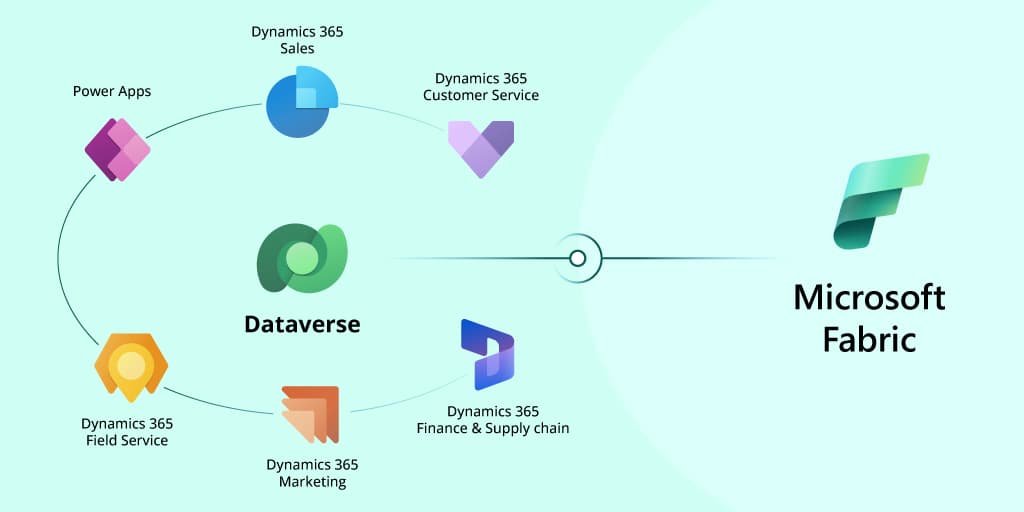
Businesses using Dynamics 365 for CRM, Finance & Operations (F&O), and Business Central generate essential data daily. Managing and analyzing this data is critical for business insights, decision-making, and operational efficiency. Microsoft Fabric for Dynamics 365, in conjunction with Dataverse Dynamics 365 integration, enables streamlined unification and advanced analytics for Dynamics 365 data.
This guide will walk you through connecting Dynamics 365 data with Microsoft Fabric using Dataverse. Dataverse provides a unified data layer for a real-time or scheduled data flow between these powerful tools.
Why Microsoft Fabric for Dynamics 365 Data Integration?
Microsoft Fabric offers a comprehensive analytics platform that combines data engineering, science, and intelligence within a single environment.
Through this integration, organizations can fully utilize Microsoft Fabric for Dynamics 365. This enables scalable, real-time analytics and a more agile, data-informed business approach.
By integrating Microsoft Fabric with Dynamics 365, organizations can:
- Unify and simplify Dynamics 365 data ingestion and transformation.
- Leverage data governance with enhanced security and compliance features.
- Gain advanced insights using AI/ML capabilities.
|
Dataverse is the core of Dynamics 365 data integration, making it easy to pull data from multiple sources into a standardized schema of tables and relationships. With Microsoft Fabric, businesses can integrate and analyze this data for real-time, data-driven decisions.
How to Connect Dynamics 365 Apps to Microsoft Fabric
You can Connect Dynamics 365 to Microsoft Fabric in two main pathways:
- Via Link to Microsoft Fabric in Dataverse
- Via Schedule Pipelines/Dataflow gen2/OData.
Each approach provides unique advantages for handling Dynamics 365 data, allowing organizations to choose the best fit for their operational needs.
Architecture Diagram: Data Flow from Dynamics 365 to Microsoft Fabric

Prerequisites for Loading Data from Dynamics 365 to Microsoft Fabric
Before connecting Dynamics 365 with Microsoft Fabric, make sure the following requirements are met:
- Access to Dynamics 365 Instances: Ensure access to relevant Dynamics 365 environments, such as CRM, Finance & Operations, or Business Central.
- Instance Connection: Link your Dynamics 365 instance to the Power Platform environment to enable smooth data flow.
- Microsoft Power Platform and Fabric Licenses: Obtain a trial or paid license for both Power Platform and Microsoft Fabric to support seamless integration.
|
Step 1: Setting Up Your Dataverse Environment
- Access the Power Platform Admin Center and create a new environment if needed.
- Choose Environment Type (e.g., Production or Sandbox) and assign a name and region.
- Enable Dataverse, the core data layer for connecting Dynamics 365 applications, for this environment.
Step 2: Linking Dynamics 365 Applications to Dataverse
- CRM Integration: Dynamics 365 CRM is natively linked to Dataverse with permissions managed through a role-based security model.
- Finance & Operations (F&O) Integration:
- Access the Dynamics Life Cycle Service (LCS) to set up Power Platform Integration.
- Configure Dataverse using templates (e.g., Dynamics 365 standard, dual-write) for seamless data flow.
- Preinstall solutions required for Project Operations, enabling and installing everything from the Dynamics 365 standard with a dual-write template. You can register your application in Azure, set client permissions, and assign admin consent here. It is valid for customers with the Dynamics 365 Project Operations license.
- Business Central Integration:
- Configure the Dataverse connection in Business Central by setting up your Environment URL.
- Define table mappings and validate connections to synchronize data effectively. Standard table mappings include:
- Customers to Accounts
- Items to Products
- Vendors to Vendors
- Sales Orders to Orders
- To integrate table field mapping, select the BC field and Integration field from the dropdown to map the table fields.
- Update Direction (Bidirectional/ToIntegrationTable/FromIntegrationTable) for the integration
- Check the fields to be validated during integration.
- Select coupling criteria for match-based coupling
- Run Full Synchronization and monitor progress
Accessing Dynamics 365 Data in Microsoft Fabric
Integrating Dynamics 365 data into Microsoft Fabric via Dataverse allows users to leverage the best features of both platforms, creating a seamless data management experience. There are two methods for bringing Dynamics 365 data into Microsoft Fabric:
- Real-Time Data Connection:
- Using Azure Synapse Link for Dataverse, you can establish a real-time data connection between Dynamics 365 and Microsoft Fabric. This approach allows for instant updates to your data in Microsoft Fabric, ensuring reports and dashboards reflect the latest changes.
- The setup involves linking Dataverse tables to Microsoft Fabric Lakehouse, enabling real-time updates to appear in Power BI dashboards within Microsoft Fabric.
- Scheduled Data Load:
- For scheduled data synchronization, an Azure AD app registration is necessary. This setup involves configuring client secrets and API permissions for accessing Dataverse.
- This approach allows data to be loaded into Microsoft Fabric via scheduled pipelines, allowing for flexible ETL processes and Power BI integration.
Conclusion: Benefits of Microsoft Fabric for Dynamics 365 Data Integration
Integrating Dynamics 365 data into Microsoft Fabric, facilitated by Dataverse, enables organizations to harness real-time Dynamics 365 data in MS Fabric, enhanced analytics, and streamlined data management. This integration empowers businesses to:
- Combine CRM, F&O, and Business Central data on a single platform.
- Utilize Microsoft Fabric services for reporting and data transformation, optimizing business processes.
- Ensure data consistency and governance with robust security and compliance controls.
- Leverage Microsoft Fabric’s analytical capabilities, including AI/ML tools, to derive insights and drive data-driven decisions.
Connecting Dynamics 365 data to Microsoft Fabric through Dataverse provides businesses with a flexible and scalable solution for managing and analyzing data across departments. By choosing between real-time and scheduled data integration methods, organizations can ensure their data is accessible and actionable, creating a foundation for deeper insights and more intelligent decisions.
Final Thoughts
LevelShift is a trusted Microsoft partner in digital transformation. It specializes in Dynamics 365 data integration and tailored solutions that drive operational efficiency for organizations. With expertise in Microsoft Fabric for Dynamics 365 and advanced data management, LevelShift enables clients to seamlessly connect Dynamics 365 applications like CRM and F&O to Fabric through Dataverse Dynamics 365 integration. This allows businesses to unify and manage their data effectively, supporting real-time analytics and enabling smarter, data-driven decision-making.
Using Dataverse as a unified data layer, LevelShift facilitates both real-time data connections and scheduled data loads, ensuring that real-time Dynamics 365 data in Microsoft Fabric is readily accessible for accurate insights. With a commitment to security and compliance, LevelShift’ solutions empower clients to govern data confidently while utilizing Microsoft’s AI and ML tools to drive actionable insights. Partnering with LevelShift enables businesses to unlock the full potential of their Dynamics 365 investments, transforming data into strategic assets that propel growth and innovation.
This blog is written by Vaka Harshitha, Data Engineer, LevelShift