Expense Management Add-on for Dynamics 365 Business Central
Automate the end-to-end employee expense lifecycle within Business Central
Eliminate the Manual Work
Paper forms, email chains, spreadsheet reports, and manual re-entry into finance systems create a cycle that is slow, error-prone, and difficult to audit.
Get More from Business Central
Replace disconnected expense tools with a native add-on that automates every step — from submission to Purchase Invoice — without leaving your existing BC environment.
Stay in Control
Configurable approval workflows, per-category spend limits, and role-based access ensure every expense is reviewed and authorized before a purchase invoice is ever created.
Why Expense Management Add-on?
Many organizations running Dynamics 365 Business Central still manage employee expense reimbursements outside the system, on spreadsheets, email threads, and paper forms.
As expense volumes grow, businesses often face increasing challenges:
- Manual Purchase Invoice creation
- Email-based approval chains with no audit trail
- Data entry errors and duplicate postings
- No visibility into outstanding reimbursements
The Expense Management Add-on brings the entire reimbursement process natively into Business Central, keeping finance teams in control, approvals moving, and every action logged from start to finish.
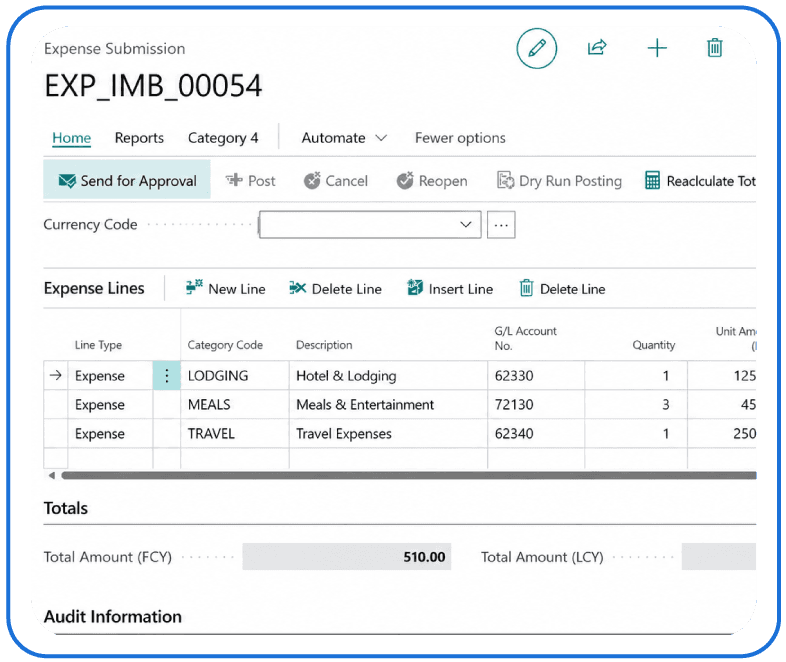
Our expense management approach
We go beyond a basic submission form. The add-on handles the full expense lifecycle natively inside Business Central.
Submission and routing
- Categorized expense reports with mileage and per diem support
- Receipt and document attachment on submission
- Native BC Workflow engine routing to the right approver
Approval and action
- Approve, reject, delegate, cancel, and reopen actions
- In-system approver experience with no email switching
- Full approval history logged per expense record
Posting and invoice creation
- One-click posting to auto-create Purchase Invoices
- Automatic GL mapping, currency conversion, and dimensional tracking
- Background async posting with exponential backoff retry logic
Integration and administration
- OData v4 REST API for mobile and third-party connectivity
- Job Queue monitoring, Application Insights telemetry
- Role-based access for employees, approvers, finance, and admins
Advantages of Expense Management Add-on
| Features | Standard Expense Tools (✗) | LevelShift Expense Management Add-on (✓) |
|---|---|---|
| Platform & access | External platform, separate login | Native Business Central extension |
| Invoice creation | Manual Purchase Invoice creation | Automated invoice creation on approval |
| Approval workflow | Email-based approval chains | BC-native workflow routing |
| Error handling | No posting retry on failure | Background async processing with retry logic |
| Audit capability | Limited audit capability | Complete end-to-end audit trail |
Supported configurations
The add-on is built for organizations running Microsoft Dynamics 365 Business Central:
Business Central 27.0 (Runtime 15.0)
Standard, mileage, and per diem expense categories
Multi-currency with automatic exchange rate handling
Pre-configured defaults seeded at installation (travel, meals, lodging, office)
Whether your team is small or distributed across multiple entities, the add-on scales with your organization.
Our Implementation Approach
LevelShift follows a structured implementation approach to deploy the Expense Management Add-on within your Business Central environment, ensuring clean integration, controlled access, and reliable processing.
Discovery & Setup
- Assess current setup, workflows, and dependencies
- Configure expense categories, GL mappings, approval workflows
Integration & Access
- Enable integrations via OData v4 REST APIs
- Implement role-based access for teams
Monitoring & Processing
- Configure Job Queue for background processing
- Set up Application Insights monitoring
Go-Live & Support
- Validate setup and support go-live
- Provide ongoing optimization on demand
Discovery & Setup
- Assess current setup, workflows, and dependencies
- Configure expense categories, GL mappings, approval workflows, and vendor templates
Integration & Access
- Enable integrations via OData v4 REST APIs
- Implement role-based access for employees, approvers, and finance teams
Monitoring & Processing
- Configure Job Queue for background processing and retries
- Set up Application Insights for monitoring and diagnostics
Go-Live & Support
- Validate setup and support go-live
- Provide ongoing optimization on demand
If you are already using Business Central and want to reduce manual expense processing, the recommended next step is a demo of the add-on within your environment.
Why LevelShift

Deep Business Central platform expertise

Proven track record of successful BC implementations

Functional, technical, and integration coverage
