cookies preferences

Copilot Enablement Services

End-to-end Microsoft Copilot enablement across Fabric, spanning use case discovery and agent development through enterprise adoption.

Customer Spotlight Thumbnail

50+

Pre-built Copilot agents

5+

Industry-specific Copilot agent blueprints

1-Day

Custom Copilot enablement workshop

Turning Microsoft Fabric Copilot into Business Value

Copilot in Microsoft Fabric is a generative AI assistant embedded natively across Data Factory, Lakehouse, Power BI, Data Warehouse, Real-Time Intelligence, and Data Science. It operates directly within your data platform, grounded in your organization's metadata, schemas, and workspace context rather than generic web knowledge.

Because Copilot consumes Fabric Capacity Units (CUs), governance and workload management are essential to prevent AI usage from competing with platform performance.

LevelShift helps organizations move from experimentation to production through use case prioritization, agent development, governance alignment, and adoption services, backed by certified Fabric expertise and enterprise-ready agent accelerators.

Request a Demo

Where Fabric Copilot Adoption Breaks Down

Copilot's on: but nobody is using it

Teams do not know what Copilot can do in their specific workload. Without a curated use-case map, adoption stalls at the demo stage.

Poor data quality undermines responses

Copilot grounds responses in your metadata and schemas. If your lakehouse is messy or undocumented, outputs are unreliable, and trust collapses.

Security and governance anxiety

Teams disable Copilot at the tenant level due to unclear data residency or Purview-alignment questions, especially in regulated industries.

No connection to proprietary systems

Copilot is limited to what lives inside your Fabric environment. Without REST plugins or custom connectors, business-critical context in your ERP, CRM, or proprietary systems stays out of reach.

Capacity consumption surprises

Copilot uses Fabric Capacity Units (CUs). Teams enable it without monitoring, then hit capacity throttling mid-sprint. Cost modeling is skipped until it hurts.
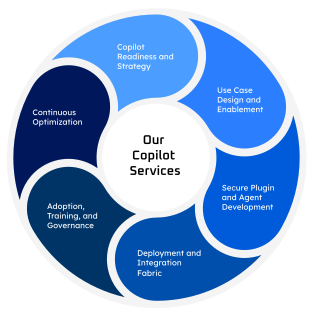
Our Copilot Services

Copilot Services Illustration

Copilot Readiness and Strategy

We help assess your existing workflows, systems, data maturity, and governance posture so you can identify where Copilot in Fabric will drive the highest impact, building a secure, ROI-driven activation plan.

Use Case Design and Enablement

Our consultants can define high-value Copilot scenarios across functions, ensuring AI-generated outputs align with real business outcomes and enhance how teams work inside Fabric.

Secure Plugin and Agent Development

We design and build compliant REST-based plugins, connectors, and custom Copilot agents (via Copilot Studio or Azure AI Foundry), ensuring tenant-safe integration with CRM, ERP, Dataverse, or proprietary systems.

Deployment and Integration Fabric

We can operationalize Copilot within Microsoft Fabric—managing environment setup, permissions, and cross-app integration to deliver unified, consistent Copilot experiences across your ecosystem.

Adoption, Training, and Governance

We help your teams co-create responsibly with Copilot through guided workshops, role-based training, and Purview-aligned governance practices built directly into your workflows.

Continuous Optimization

We can monitor Copilot usage, refine prompts, tune plugin/agent performance, and strengthen compliance controls to maximize ROI as Copilot capabilities evolve.

Ready-to-Deploy Copilot Agents by Industry

Supplier Fraud & Authenticity Detector Agent icon

Supplier Fraud & Authenticity Detector Agent

RetailCopilot

Detects fake invoices, manipulated purchase orders, and fraudulent supplier documents using machine learning and anomaly detection to ensure supplier authenticity and reduce risk.

Return Likelihood Prediction Agent icon

Return Likelihood Prediction Agent

RetailCopilot

Analyzes product and order data to predict which items are most likely to be returned, enabling retailers to reduce logistics and restocking costs.

Last-Mile Delivery Optimizer Agent icon

Last-Mile Delivery Optimizer Agent

RetailCopilot

Optimizes delivery routes to reduce expenses, shorten travel times, and improve fuel efficiency, while maintaining compliance with service-level commitments.

Store Footfall Heatmap Generator Agent icon

Store Footfall Heatmap Generator Agent

RetailCopilot

Analyzes in-store camera and Wi-Fi data to create customer movement heatmaps, supporting store layout improvements and merchandising strategies.

Dynamic Assortment Planner Agent icon

Dynamic Assortment Planner Agent

RetailCopilot

Identifies the ideal SKU mix for each store, region, or season by analyzing demand patterns, trends, and shelf performance to maximize sales and inventory efficiency.

Personalized Promotion Bundling Agent icon

Personalized Promotion Bundling Agent

RetailCopilot

Dynamically creates product bundles and promotional offers to maximize conversion, profit margin, and customer engagement.

Dynamic Pricing Agent icon

Dynamic Pricing Agent

RetailCopilot

Monitors market price fluctuations, inventory levels, and demand signals in real time to recommend price adjustments.

Store Performance Agent icon

Store Performance Agent

RetailCopilot

Aggregates POS data, foot traffic, and shrinkage metrics to surface store-level anomalies and flag underperformers.

Supply Chain Optimization Agent icon

Supply Chain Optimization Agent

RetailCopilot

Ties demand forecasts, vendor lead times, and distribution schedules together, proactively surfacing stockout risks and overstock positions.

Virtual Try-On Agent icon

Virtual Try-On Agent

RetailCopilot

Allows customers to virtually try on garments or accessories using AR and AI-generated simulations with camera or 3D body mapping to enhance the shopping experience.

Not Sure Where to Start?

Try our custom Agent in a Day workshop. In this structured one-day engagement, our AI engineers work alongside your team to identify high-value Copilot use cases, define the right agent architecture, and build a working prototype within your Microsoft Fabric environment.


Why LevelShift

  • Microsoft Solutions Partner and Microsoft Fabric Featured Partner
  • Dedicated AI Center of Excellence with deep expertise in Microsoft AI, Copilot, and agent development for secure, enterprise-ready solutions
  • 150+ reusable AI agents and accelerators across Manufacturing, Financial Services, Retail, Energy, Real Estate, Technology, and other industry use cases
  • Proprietary Six-Pillar Enterprise AI Framework that enables scalable, secure, and governed AI adoption across the enterprise
Microsoft Solutions Partner

Our Perspectives

FAQs

Native Copilot in Fabric is Microsoft's built-in AI layer that helps with workload-specific tasks: writing DAX, generating reports, building pipelines, and using your workspace metadata as context. A custom agent built with Copilot Studio or Azure AI Foundry extends this with your business logic, external data sources, and domain-specific decision flows. Native Copilot is the starting point; custom agents are how you get answers specific to your business.
Copilot requires Fabric capacity of F64 or higher, or a Power BI Premium P1 equivalent. A Fabric administrator must enable it at the tenant level. Custom agents in Copilot Studio or Azure AI Foundry have separate licensing, typically billed per message or on a compute basis. LevelShift models the total cost of ownership during the Readiness Assessment so capacity impacts are understood before deployment, not after.
With a well-structured Fabric environment and documented data models, native Copilot can deliver value within weeks. Custom agents typically require four 4 to 8 weeks from use case design through production, depending on integration complexity and data readiness. LevelShift's Agent in a Day Workshop significantly compresses this timeline, producing a working prototype on day one and a deployment path within 2 to 4 weeks.
Yes, via REST-based plugins or Power Platform connectors. LevelShift builds secure connectors to SAP, Oracle, Salesforce, Dynamics 365, ServiceNow, and custom APIs, with tenant-safe security controls, admin approval flows, and aligned with Purview access governance. Your agent answers questions grounded in live business data, not just data stored in your Fabric environment.
In Power BI, Copilot can generate report pages from natural-language prompts, write DAX measures, summarize reports, and answer data questions via the Copilot chat panel. These capabilities are available in both the Fabric web experience and Power BI Desktop, and require a Copilot-enabled workspace. LevelShift optimizes your semantic models to improve the reliability and precision of Copilot outputs in Power BI.
Purview provides the data classification, lineage, and access control layer that governs what Copilot can see and surface. Without it, Copilot lacks guardrails for sensitive data. LevelShift integrates Purview into every Copilot deployment so AI outputs remain compliant, traceable, and auditable from day one.
You need a Fabric workspace at the appropriate capacity tier, well-structured and well-documented data models, and governance policies defined at the tenant level. LevelShift's Copilot Readiness Assessment covers all three, validating your environment setup, security controls, and adoption readiness before you go live. Teams seeking a faster on-ramp can start with our Agent in a Day Workshop to build confidence and scope alongside the assessment.

Turn Copilot from a Feature into a Business Advantage