Your Dynamics AX system is a relic; a capable one, sure, but a relic. It was built for a world where “the cloud” was something IT warned you about, where AI was science fiction, and where your biggest integration headache was making two systems talk over a weekend batch job. That world is gone. The question is not whether Dynamics 365 is better; it demonstrably is. The question is what, specifically, changes for your operations, your team, and your cost base. That is what this blog answers.
AX vs Dynamics 365 Finance and Operations: A feature comparison
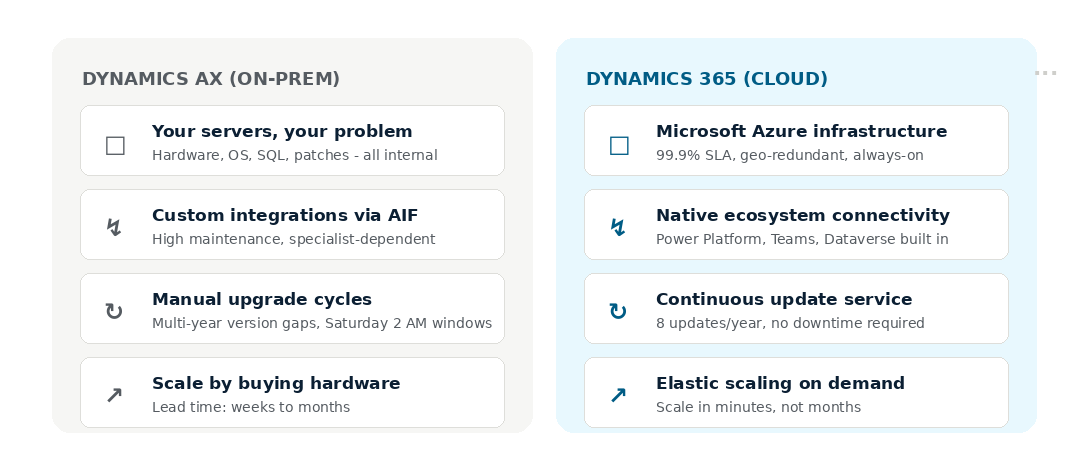
AX runs on your hardware, your SQL server, and your maintenance schedule. Dynamics 365 Finance and Operations runs on Microsoft Azure. That shift sounds administrative. It is not.
Gone are the Saturday 2 AM maintenance windows. Microsoft ships eight platform updates per year, plus security patches, compliance updates, and performance improvements, all as part of the service. The DBA hours, the cross-team coordination, the risk of a failed Friday-night patch: none of that follows you to D365. Your IT team stops managing infrastructure and starts managing outcomes.
The bigger change is structural. AX was built with integrations as an afterthought. Dynamics 365 was designed from the ground up for an ecosystem: Power Platform, Teams, Dataverse, and Azure Logic Apps. These are not add-ons. They are the same fabric. What once required a specialist to build and another to maintain becomes a configuration decision.
The result: organizations migrating from AX to Dynamics 365 typically report a 30 to 40 percent reduction in IT overhead within 12 months of go-live.
Role-based workspaces in Dynamics 365 F&O
AX users will recognize this: three menus deep, six clicks from the home screen, and a form that looks like it was designed in 2008. It was. The bar for enterprise software usability has significantly moved.
Dynamics 365 is role-specific by design. A warehouse manager sees only what they need. A CFO’s workspace surfaces exception alerts, approval queues, and live KPI tiles without a single navigation click. Embedded Power BI reports sit inside the workflow rather than requiring an export to a separate tool. The data needed to close the month or answer a board question is surfaced before it is requested.
Mobile access has changed completely. AX mobile was technically possible and practically unreliable. D365 natively supports genuine mobile access for warehouse management, expense capture, and approvals. A warehouse operative can receive, pick, and confirm stock transfers from a handheld device. A regional manager can approve a purchase order from a hotel lobby. For logistics teams and organizations with distributed workforces, this capability alone justifies the move.
What happens to your AX integrations when you move to Dynamics 365
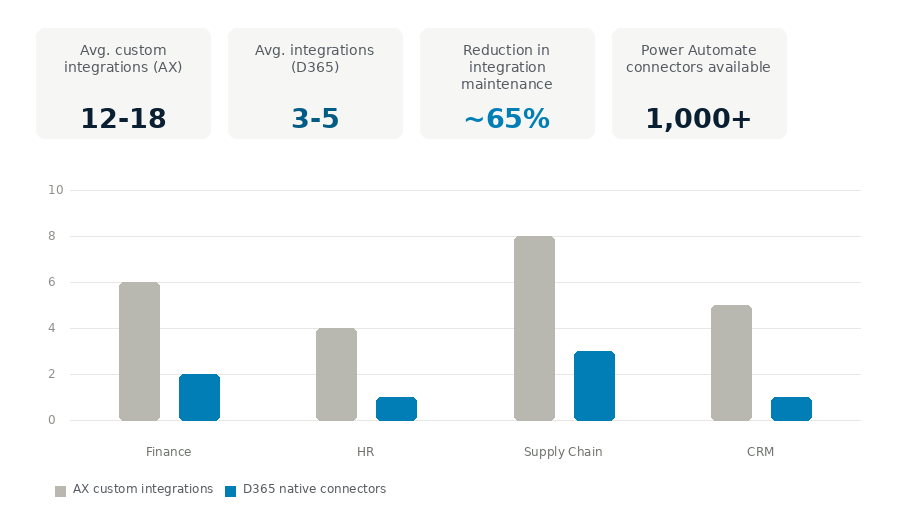
Here is a pattern we see repeatedly. A distribution company running AX has 14 separate integrations: a WMS, a 3PL portal, a customer portal, an e-commerce platform, and several reporting tools. Each integration has an owner, and each owner maintains a spreadsheet. When one breaks, fault-finding takes a day before fixing begins.
After migrating to Dynamics 365, the landscape collapsed to four managed connections. Three ran through Power Automate with no custom code. The fourth was an AppSource ISV solution installed in an afternoon. The integration maintenance burden dropped by 65 percent. More importantly, the team stopped second-guessing their data. When inventory levels, order status, and customer records all draw from the same source of truth, decisions become faster and more accurate.
This is the Dataverse effect. By unifying data pipelines under a single common architecture, standardizing your Dynamics 365 integration environment eliminates point-to-point maintenance costs and secures continuous system synchronization. When D365 Finance and Operations, D365 Sales, and your other Microsoft applications share a common data layer, you are not building bridges between systems. You are operating a single connected system. The point-to-point integration model that AX required does not carry over to D365. It stays behind.
The AI gap between AX and Dynamics 365
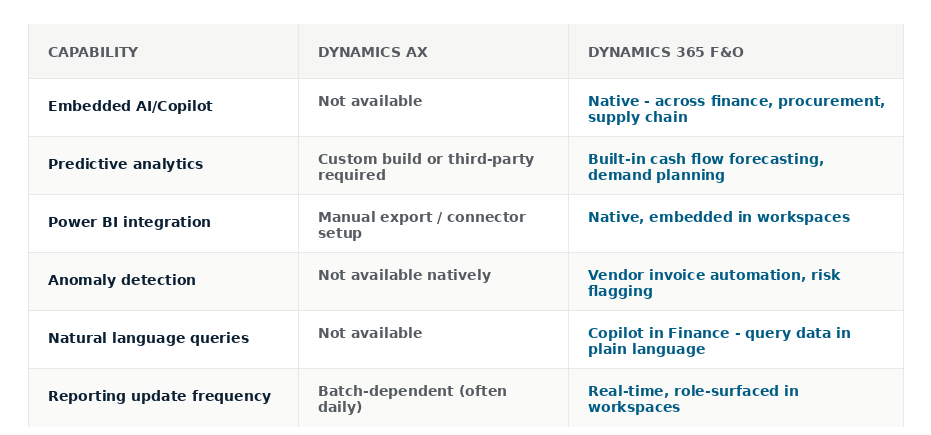
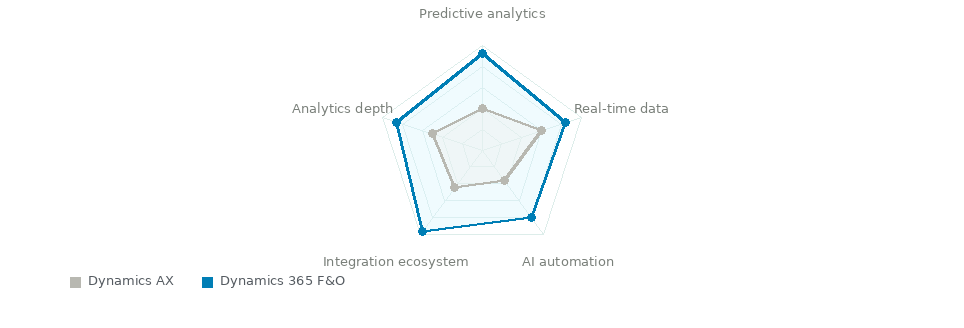
AX was designed to record, process, and report. Those functions still matter, but they are the floor, not the ceiling. The organizations winning in their markets are not just recording what happened. They are predicting what will happen and acting before the problem hits.
Dynamics 365 ships with Copilot built in. Deploying this automated assistant allows teams to hand off repetitive ledger validations; activating a specialized Copilot Finance and Operations agent automates daily bank reconciliation workflows and extracts deep pattern insights from transactional data. In Accounts Payable, it automates invoice matching and flags exceptions before they reach an approver. In Cash Management, it generates rolling forecasts from live transaction data, replacing the spreadsheet that a finance analyst previously rebuilt every Monday morning. In Procurement, it surfaces vendor risk signals before a supply disruption becomes a business problem.
Every quarter, Microsoft ships new Copilot features, every AI-driven automation that routes invoices or flags exceptions, and organizations still on AX fall further behind. Because the distance to where modern ERP operates continues to grow.
The companies struggling most are those that made the “wait-and-see” call three years ago. They are no longer comparing AX to D365. They are comparing AX to competitors who have had two years of AI-assisted decision-making built into their daily operations. That is a compounding operational disadvantage.
What you are buying when you upgrade AX to Dynamics 365
The upgrade conversation is framed wrong almost every time. Leaders hear “AX upgrade” and think of cost, disruption, and risk. Those are real. But they describe the journey, not the destination.
You are not buying a newer version of AX. You are buying an operating model that assumes your data is visible in real time, your systems connect without custom code, your people can act on exceptions without writing a query, and your organization becomes more capable every month rather than only once per upgrade cycle.

Risk is real, and timing matters
The reality of support makes the urgency concrete. Microsoft ended mainstream support for AX 2012 in 2021. For most versions, extended support has also elapsed. Organizations still on AX are running infrastructure without guaranteed security patches, a material risk for any business subject to data protection regulations, financial audit requirements, or customer security obligations. The risk of staying is accumulating now, quietly, in your compliance posture, your integration debt, and your team’s ability to answer questions the business is starting to ask.
Microsoft’s support position, the widening AI capability gap, and the compounding cost of integration debt have already answered the “whether” question for most AX environments.
If you are taking the AX vs Dynamics 365 decision seriously, the right next step is a structured assessment of your current environment, what your operations should look like in two years, and whether your current system can enable that transition. LevelShift runs a structured, no-obligation AX Readiness Assessment for organizations evaluating the move to Dynamics 365 Finance and Operations. This formal technical blueprint maps out your entire functional translation; registering for a comprehensive Finance and Operations assessment uncovers specific custom-code dependencies and provides a risk-mitigated transition timeline. In two to three working days, you will have a clear picture of your migration complexity, integration consolidation opportunities, and the outcomes your environment can realistically achieve.
FAQs
Q: What is the main difference between Dynamics AX and Dynamics 365?
Dynamics AX is an on-premises ERP built for recording and processing. Dynamics 365 Finance and Operations is a cloud-native platform with built-in AI, real-time analytics, and a native integration ecosystem through Microsoft Azure and Power Platform.
Q: Is Dynamics AX still supported by Microsoft?
Microsoft ended mainstream support for AX 2012 in 2021. Extended support has run out for most versions, meaning organizations still on AX are operating without guaranteed security patches and accumulating compliance risk.
Q: How long does it take to upgrade AX to Dynamics 365?
Most migrations take between 6 and 12 months, depending on the complexity of customization, the scope of integration, and the volume of data. Time to measurable operational value typically begins around month 6 post-go-live.
Q: What happens to AX integrations after migrating to Dynamics 365?
The majority of custom AX integrations can be replaced by native connectors through Power Automate, Dataverse, or AppSource ISV solutions. Organizations typically reduce their integration footprint by 60 to 65 percent after migration.