
Microsoft Azure
Modernize your Data Infrastructure: On-Premise SQL to Azure Migration
The business world is rapidly changing, and the need for a robust data infrastructure cannot be overstated. As businesses grow and expand, t...
Read More→
October 15, 2026

AI is only as good as the data it can reach. A cloud move can fix aging hardware while leaving slow data flows, fragile integrations, and oversized servers untouched. When AI is on the roadmap, those gaps decide whether your first use case delivers or stalls.
Microsoft Azure offers multiple paths to modernize infrastructure, applications, and data workloads, from migrating existing virtual machines to adopting managed services, containers, and cloud-native architectures. However, not every workload needs the same approach, and moving to the cloud alone does not automatically make an organization AI-ready.
The right cloud migration strategy starts with the business outcome, then picks a route for each workload. These six factors help you plan cloud migration for AI: what to move to Azure, what to change on the way, and how to prove the move worked.
AI models and agents need data that is current, connected, and governed. On premises, data usually lives in separate systems and refreshes through nightly batch jobs. An AI assistant built on that data answers yesterday’s questions.
In the cloud, operational data can sync to an analytics layer in near real time. Microsoft Fabric mirroring, for example, replicates databases into OneLake continuously. Azure AI services then run next to that data, with compute that grows for training or inference and shrinks when the job ends.
Three things change when data moves to Azure and becomes a cloud data foundation for AI:
Infrastructure, applications, and data in the cloud are the foundation for enterprise AI scalability. Cloud migration for AI is where that foundation gets built.
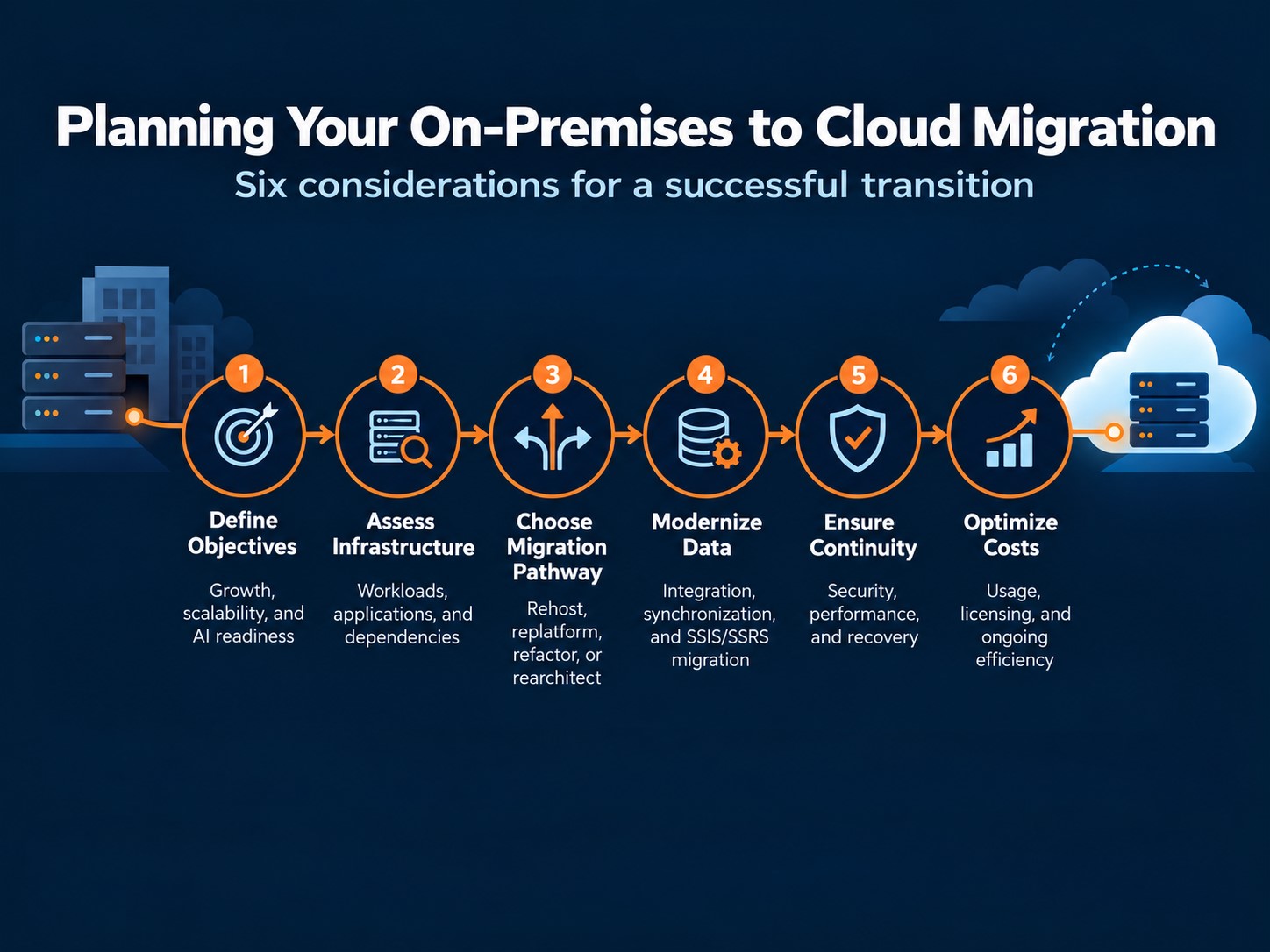
A company replacing aging servers and one preparing to use AI across operations may both choose a cloud like Azure, but they need different plans. The first may need a faster move with little application change. The second may also need better data quality, faster updates, and stronger access controls.
Express the benefits of cloud migration you expect as two or three measurable outcomes before choosing services or dates:
Record today’s performance and cost so you can measure the result after migration.
A customer portal may rely on a database, an identity service, and an order system in the same building. Moving the portal alone could make it slower or break a process that previously worked across a local network.
Inventory applications, servers, databases, data flows, licenses, owners, and business-critical periods. Then map which systems call one another, how often data moves, and how much downtime each process can tolerate. Group tightly connected systems into sensible migration waves. Choose a pilot that can reveal risks relevant to the larger move.
For a fuller planning checklist, see LevelShift’s cloud migration challenges guide.
There is no single best route for every application. When weighing rehost vs refactor vs rearchitect, use the condition of the workload and the change you need to choose a starting point.
| What you find | Route | Azure option | What to prove first |
| VMware estate, tight timeline | Rehost | Azure VMware Solution, or Azure Migrate to Azure VMs | Dependencies, performance, licensing, right-sized capacity |
| App works, but server upkeep is the burden | Replatform | Azure App Service, Azure SQL Managed Instance | Feature compatibility, operational changes, recovery options |
| Releases are slow or the app cannot scale | Refactor to containers | Docker on Azure Kubernetes Service (AKS) or Azure Container Apps | Build pipeline, configuration, state handling |
| Event-driven or background tasks | Refactor to serverless | Azure Functions, Logic Apps, Azure Web Jobs | Execution limits, triggers, cost per run |
| Design limits resilience, security, or cost control | Rearchitect | Redesign against the Azure Well-Architected Framework | The improvement needed and whether it justifies the effort |
| Redundant system, or a dependency that cannot move yet | Retire or retain | Hybrid connectivity through Azure Arc or VPN | Who still uses it, how remaining systems connect securely, a review date |
A common progression: rehost first for speed, then containerize, then move suitable components to serverless as each step proves its value. A VMware workload can move to Azure VMware Solution with little or no code change, buying time for legacy application modernization on your schedule.
Rearchitecting with the Well-Architected Framework: The framework assesses a workload across five pillars: reliability, security, cost optimization, operational excellence, and performance efficiency. Use it to decide where a redesign pays off and where it does not.
In Azure cloud migration and modernization, the architecture should follow the workload and the business outcome, not modernization for its own sake.
A database can reach Azure while its reports still arrive a day late, which is why cloud data modernization needs its own plan. Start with the questions the business needs answered:
Then assess data quality, update frequency, and the systems that feed each report. These checks also determine your data readiness for generative AI.
| SSIS. In an SSIS to Azure Data Factory migration, most packages run on Azure-SSIS Integration Runtime with little change. Check custom components and connectivity first, and rebuild as Data Factory or Fabric pipelines where near real-time data matters.
SSRS. Move compatible RDL reports to Power BI paginated reports, redesign others as interactive Power BI reports, or keep a report server for now. LevelShift cloud data migration accelerators: Our SSIS accelerator automates package analysis to show what moves as is and what needs rework. Our SSRS-to-Power BI accelerator converts reports in bulk. Automation levels depend on source complexity. |
Set access rights, encryption, logging, and recovery needs before a workload moves. Agree on how long the service can be unavailable and how much data loss the business can tolerate. These limits shape backups, replication, and the migration window.
Rehearse the move with realistic data and traffic. Check the application’s normal and peak performance, verify that reports and integrations still work, and test the recovery plan. Success means users can complete the same critical tasks safely after the move.
Moving an on-premises server to an equally sized cloud machine can turn unused capacity into a monthly charge. Size cloud resources around actual workload demand rather than what was historically provisioned on premises. Estimate costs across compute, storage, data transfer, licensing, migration, and support, then test how those costs change between normal and peak demand.
Flexera’s 2026 State of the Cloud report found that respondents estimated 29% of infrastructure and platform cloud spend was wasted. This is a survey-based estimate rather than a prediction of savings for any particular organization, but it reinforces the importance of managing consumption after migration to realize cloud adoption benefits in 2026. Read the report
After launch, review usage against the original baseline. Reduce idle capacity, set alerts for unusual spend, and revisit the architecture when demand changes. Assign an owner to these reviews; cost control is an operating habit, not a task that ends at go-live.
If you plan to scale, infrastructure, applications, and data all belong in the cloud. Each layer brings a different return toward an AI-ready cloud.
| Layer | What changes | What it means for AI |
| Infrastructure | Capacity sized to demand, no hardware refresh cycles, built-in backup and disaster recovery | Compute for training and inference on demand, without buying GPUs |
| Applications | Faster releases through containers and CI/CD, autoscaling for peak periods | Apps that can call AI services and agents through APIs |
| Data | One governed source, refreshed at business pace instead of overnight | Current, trusted data for models, copilots, and agents |
A US title insurance provider faced rising infrastructure costs and slow, manual document work. LevelShift moved its legacy systems to Azure, shifted background processing to Azure Web Jobs, and added document recognition and parallel search. The published customer story reports 35% lower infrastructure costs, 40% faster request processing, and 45% greater operational efficiency. Those results reflect both migration and process changes; they should not be attributed to hosting alone.
Read the full title insurance migration story.
The first migration wave should leave you with evidence: which dependencies were missed, how performance and cost changed, and whether users can complete their work. Apply those lessons before moving the next group of systems. If AI is part of the longer-term goal, include data quality, update speed, and access controls in that review.
Explore your Azure cloud migration strategy with LevelShift’s Azure cloud team to identify the first sensible wave and the changes worth making along the way.
1). Why does AI depend on cloud migration?
AI needs current, connected, governed data and compute that grows on demand. On-premises estates usually hold data in silos with overnight refreshes. Moving to Azure puts data, apps, and AI services on one platform with shared identity and access controls.
2). What should move first?
A workload with a clear benefit, known dependencies, an accountable owner, and a manageable recovery path. The easiest-looking application may still rely on systems that are not ready to move.
3). Should we rehost VMware workloads or modernize first?
Rehost first when time or a data center exit drives the move. Azure VMware Solution lets you keep existing tools and skills. Modernize individual workloads afterward, where containers or serverless solve a real problem.
4). Must legacy applications be rebuilt?
No. Some move with few changes, others need a managed service, code changes, or a redesign. Keep a system on premises for now when its dependencies or constraints make an immediate move unwise.
5). Can existing SSIS and SSRS workloads move to Azure?
Yes, though the route differs. Many SSIS packages run on Azure-SSIS Integration Runtime with minimal change, and SSRS reports can move to Power BI. LevelShift’s accelerators shorten both paths. Test compatibility, data sources, and report behavior before committing to a timeline.
6). Will cloud migration make our data ready for AI?
Not by itself. AI also needs reliable data, timely updates, clear definitions, and the right access controls. Plan and test those as part of the data move.

Aishwarya Nagarajan is a Senior Content Writer in the Microsoft Dynamics 365 practice at LevelShift, specializing in ERP and CRM transformation, AI-powered business applications, and customer engagement. She creates thought leadership and solution-focused content that helps organizations modernize operations, improve decision-making, and drive sustainable business growth.

The world of business has seen remarkable transformation through digital solutio...

LevelShift had the opportunity to attend Microsoft Ignite 2024, where the buzz a...

The business world—in constant flux—continues to embrace digital transformation....
Modernize your Data Infrastructure: On-Premise SQL to Azure Migration
The business world is rapidly changing, and the need for a robust data infrastructure cannot be overstated. As businesses grow and expand, t...

The 8 Building Blocks of End-to-End Azure Cloud Platform: A Guide for the Modern Enterprise
Microsoft Azure stands as one of the most comprehensive cloud platforms, offering an expansive range of services that span infrastructure, a...

Six Steps for a Cloud Readiness Assessment
By 2025, the data stored in cloud data centers will exceed 100 Zettabytes says latest reports. Businesses are constantly trying to cope with...