Here’s a sentence that would have sounded strange from a software vendor five years ago: “If it doesn’t work, you don’t pay.”
That’s exactly what Salesforce is betting on with its new Agentforce Help Agent, a prebuilt AI service agent that can be deployed in minutes. According to Salesforce, the agent has already handled more than 4.3 million customer support inquiries on its own Help site, autonomously resolving 70% of them. While Salesforce has also cited resolution rates of around 75-76% in other customer success materials for the same deployment, the 70% figure comes directly from the official Help Agent launch announcement.
The more significant announcement, however, wasn’t the resolution rate. It was the pricing model. With Agentforce Help Agent, Salesforce charges $2 per successful resolution, and if the AI can’t resolve the issue or the conversation is escalated to a human, there’s no charge.
For any manufacturer that’s ever tried to budget for an AI-powered service desk — parts-status calls spiking during peak production, warranty claims backing up after a recall, dealer and distributor tickets that don’t stop at 5 pm — that’s a genuinely different conversation.
And it’s one we’re already having with clients here at LevelShift, a Salesforce Partner since 2012 that’s spent years elbow-deep in Service Cloud, Data Cloud, and Agentforce implementations for manufacturers running multi-division service operations.
Did you know?
Get the full report
Let’s break down what’s actually changing, and then get into the questions every enterprise service leader should be asking before they flip the switch.
Meet the Help Agent
Agentforce Help Agent is Salesforce’s answer to a problem that’s dogged AI service rollouts since day one: building a good agent used to be real work. You connected your own knowledge base, defined your own actions, wired up your own channels, and hoped the data underneath was clean enough to not embarrass you in front of customers.
Help Agent is built to skip most of that. It grounds itself automatically on your existing Salesforce Knowledge, lets you drag and drop extra files or crawl a URL for anything missing, and comes with a library of prepackaged actions — case management, appointment scheduling, order updates — so it can actually do things, not just answer questions. Turn it on across voice, web, portal, and messaging from a single screen, and it’s live.
For a manufacturing service desk, those three action types map directly onto the calls that already come in every day:
- Case management — warranty claims and equipment fault tickets, logged and triaged without a rep opening the case by hand
- Order updates — parts order and shipment status, one of the highest-volume, most repetitive queries a manufacturing service desk handles
- Appointment scheduling — field service technician dispatch, without a round of phone tag to find a slot
It’s not a blank AI experiment. Salesforce built it on lessons from running Agentforce on its own help site, and it shows in how opinionated the out-of-the-box setup is.
The Pricing Model: $2 Per Resolution, Nothing More
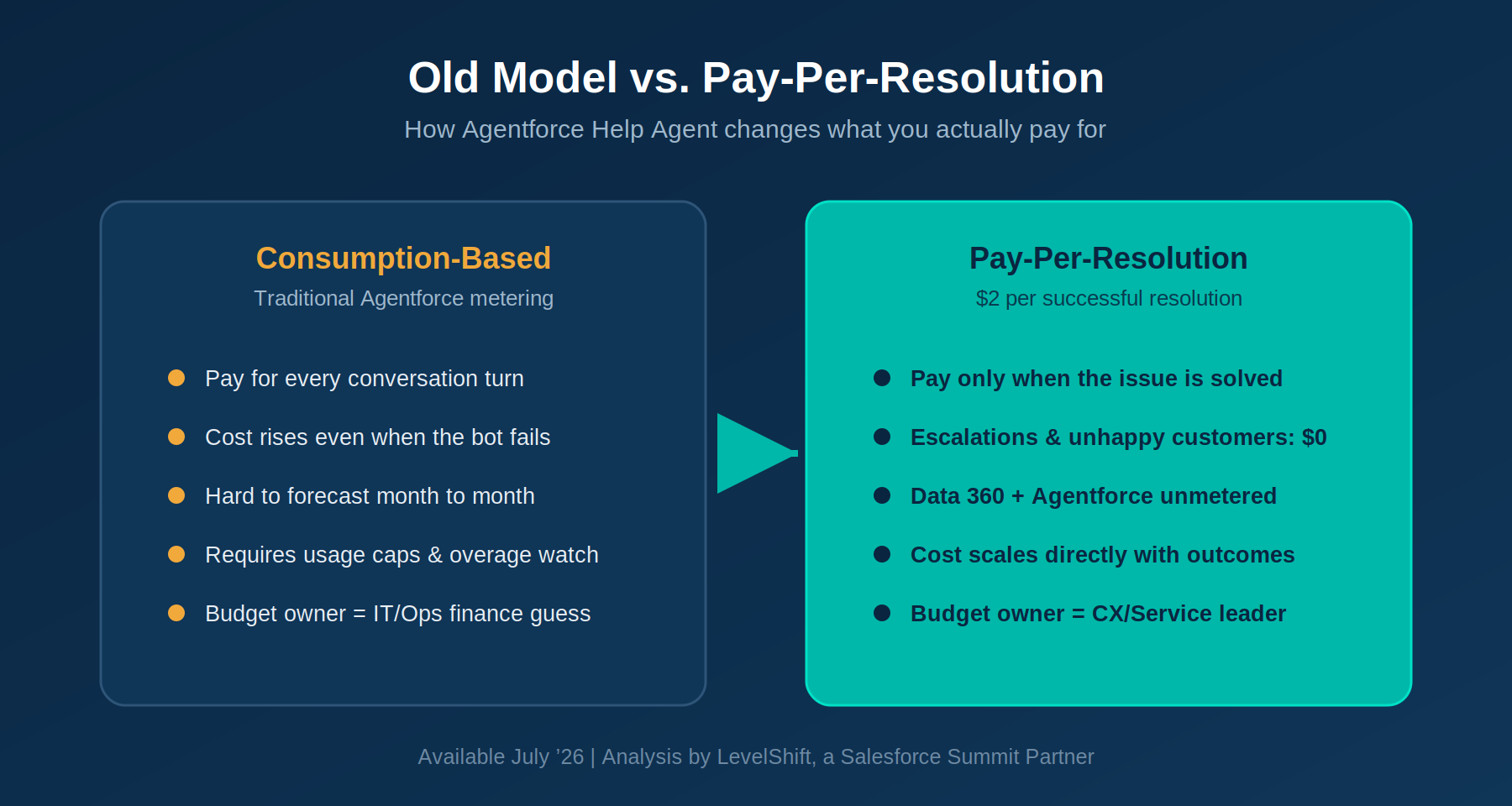
Here’s the mechanic: when Help Agent resolves a customer issue autonomously, start to finish, you’re charged $2. If the customer asks for a human, gives negative feedback, or just walks away frustrated, you pay nothing — and the agent hands the human agent full context so nothing gets lost in the handoff. Both Data 360 and Agentforce stay unmetered during the interaction, so there’s no separate meter quietly running underneath the conversation.
Considering Data 360 for smarter marketing? Read how we helped a non-profit client build an AI-ready foundation while reducing manual effort by 80%
Old Model vs. Pay-Per-Resolution Model – Agentforce Help Agent
What counts as a “resolution,” exactly?
This is the detail worth sitting with before you get excited about the sticker price. Per Salesforce, a chargeable resolution is an issue the Help Agent handles autonomously, from start to finish — no human intervention, and the customer doesn’t reject the outcome or ask to be escalated. If a customer says “let me talk to a person,” if they give a thumbs-down or negative signal, or if the conversation ends without closure, it isn’t billed. That’s the whole appeal of outcome-based pricing — but it also means the definition of “resolved” your Salesforce org uses internally needs to match the one the billing meter uses, or you’ll get surprised at renewal time either way.
Why outcome-based pricing is a genuinely good structural shift
Beyond the obvious appeal of “we only pay when it works,” outcome-based pricing does a few things that matter operationally:
- It removes the forecasting guesswork — your Agentforce spend becomes a variable cost tied to volume of solved problems, not raw traffic
- It aligns vendor incentives with customer incentives, since Salesforce doesn’t get paid for a bad experience
- It gives finance a cleaner cost-per-outcome number to compare against the fully loaded cost of a human agent handling the same ticket
- It removes the “we’re not sure if we’re getting our money’s worth” anxiety that plagued a lot of first-generation bot deployments
Availability
Agentforce Help Agent and the reimagined Agentforce Customer Service Portal are generally available July 2026, with pay-per-resolution pricing available the same month.
Straight Answers to the Questions Everyone’s Actually Asking
We put together this FAQ because the sales pitch is easy to understand — it’s the operational decisions around it that actually determine whether this saves you money or quietly costs you more than your old model did. These are the questions our clients at LevelShift bring to us first.
Is pay-per-resolution actually cheaper?
It depends on your resolution rate and current support costs. Calculate your expected monthly AI resolutions × $2, then compare that to your average cost per customer contact.
If most of your inquiries are repetitive, such as password resets or order status requests, pay-per-resolution can significantly reduce service costs. For manufacturers, that usually means parts-status checks and basic warranty intake — exactly the volume that clogs a service desk today. For more complex issues, like a multi-part equipment failure that needs a technician’s judgment, the savings may be lower.
This is why a cost-benefit assessment should come before implementation.
How do we calculate ROI before deployment?
Start by analyzing your case volume by issue type rather than looking at total tickets.
Estimate which categories are most likely to be resolved autonomously, calculate the projected cost at $2 per resolution, then compare it with your current support costs. Include implementation and knowledge optimization in your business case.
Many organizations achieve the fastest ROI by starting with simple, high-volume service requests before expanding AI across more complex scenarios.
Is our organization ready?
Successful deployments depend on more than licensing.
Ask yourself:
- Is your knowledge base accurate and up to date?
- Are Service Cloud processes standardized?
- Do you have AI governance and escalation rules?
- Is customer data complete and connected?
- Can you measure success with the right KPIs?
Addressing these gaps before deployment leads to higher resolution rates and faster ROI.
What does knowledge quality require?
Help Agent is only as effective as the knowledge it can access.
Review your Salesforce Knowledge for outdated content, duplicate articles, inconsistent information, and missing metadata. Well-structured, accurate knowledge helps AI deliver reliable answers and improves autonomous resolution rates.
How should governance and escalations be designed?
Governance defines what the AI can and cannot do.
Set clear rules for autonomous actions, confidence thresholds, approvals, and compliance requirements. Equally important is designing seamless escalations so customers never have to repeat information when transferred to a live agent.
What Service Cloud considerations matter?
Your Service Cloud architecture should support AI-driven workflows.
Review case structures, routing rules, automations, validation logic, and integrations to ensure Help Agent can create, update, and manage cases without disrupting existing processes. For manufacturers, this usually means confirming that case-to-technician routing and field service dispatch logic won’t conflict with what the agent tries to automate.
A technical assessment before deployment helps prevent avoidable issues after go-live.
Which metrics should we track after launch?
Go beyond cost savings by monitoring:
- Autonomous resolution rate
- Escalation rate
- CSAT
- Cost per resolution
- First-contact resolution
- Average handling time
- Knowledge usage
Tracking these KPIs regularly helps identify optimization opportunities and measure long-term business value.
How do we migrate from Einstein Bots deployments?
Migration should be gradual rather than a complete replacement.
Evaluate your existing bot journeys, identify what can be retained, and pilot Help Agent with selected use cases before expanding — for manufacturers, a dealer or distributor portal handling parts and warranty questions is often the natural starting point. Existing Knowledge and Data Cloud investments can often be reused, while custom actions and integrations should be reviewed and updated for the new framework.
A phased migration minimizes disruption while maximizing business value.

The Right AI Pricing Model Still Needs the Right Implementation Partner
Pay-per-resolution is a smarter way to invest in AI, but success depends on far more than pricing. Organizations that see the greatest returns build the right foundation first, with trusted knowledge, strong governance, scalable Service Cloud architecture, and clear performance metrics.
That’s where LevelShift comes in.
As a Salesforce Partner since 2012, with 530+ Salesforce projects delivered and a 4.9-star AppExchange rating across 170+ reviews, we’ve helped multi-division industrial and equipment manufacturers modernize service operations across Agentforce, Service Cloud, Data Cloud, Revenue Cloud, and Field Service. From readiness assessments and implementation to ongoing optimization through our On-Demand Services model, we ensure your Help Agent is built to resolve more, cost less, and deliver lasting value.
Ready to see if Agentforce Help Agent is right for your manufacturing service operation?
Connect with LevelShift for an AI readiness assessment and ROI evaluation, and discover how to maximize every resolution from day one.