
CRM Solutions
What Agentic AI Means for the Future of CRM
A sales manager begins Monday morning with dozens of emails, forecast requests, overdue opportunities, and customer conversations awaiting a...
Read More→
February 5, 2025
Clinging to outdated technology in today’s fast-paced business environment is like relying on a typewriter in an era of cloud-based word processors. It gets the job done, but you would miss out on all the latest features guaranteed to make your life much easier. For businesses still using Dynamics AX, it’s time to consider the advantages of upgrading to Dynamics 365. The move is about more than staying current. It unlocks features that help you stay competitive, adapt quickly, and grow rapidly. Dynamics 365 offers a modern, cloud-based platform with enhanced functionality, integration, and scalability. But what exactly makes the upgrade worthwhile? In many organisations, ERP modernisation has become a priority due to rising cybersecurity risks, increasing compliance pressure, and the shift toward AI-enabled business operations.
Dynamics AX, formerly known as Axapta, was a popular ERP solution for medium to large organizations. It offered strong financial, supply chain, and operations management capabilities. However, mainstream support ended in 2021. Since then, businesses relying on AX have faced significant challenges. These include security vulnerabilities, outdated compliance practices, and limited access to modern technologies such as cloud computing, AI, and advanced analytics. This is especially critical today, as cloud ERP adoption continues to rise globally, with many mid-to-large enterprises moving away from legacy on-premises ERP systems to reduce long-term technical debt and improve agility.
Its on-premises architecture requires heavy IT investment. It also lacks cloud-native functionality and makes remote work more difficult, which is a major drawback in today’s hybrid business world. Add in data silos and slower decision-making, and the case for upgrading to a more adaptable solution like Dynamics 365 becomes clear. Modern cloud ERP platforms also enable faster cross-department reporting, real-time forecasting, and centralised data governance, which legacy AX environments typically struggle to support without heavy customization.
If you’re planning an upgrade and want a clear path from assessment to go-live, our AX-to-Dynamics 365 upgrade service provides migration planning, data migration, testing, training, and post-launch support.
This type of structured approach is increasingly recommended for enterprises that want to minimise downtime and avoid operational disruption during ERP migration projects.
When comparing Dynamics AX vs Dynamics 365, Dynamics 365 represents a significant step forward. It offers modern capabilities designed to meet both current and future challenges. Here is what the upgrade brings to your organization:
Cloud-Native Advantage
Unlike Dynamics AX, Dynamics 365 is cloud-based. It offers anytime, anywhere access, scalable resources, and lower infrastructure costs. This flexibility helps businesses adapt quickly, support remote teams, and focus on growth. Automatic updates keep you always up to date with the latest features.
This also supports better business continuity, since Microsoft Azure data centres provide built-in disaster recovery, redundancy, and enterprise-grade uptime performance.

Enhanced ERP Features
Dynamics 365 includes AI-driven insights, predictive analytics, and process automation. These tools support real-time decision-making and more efficient operations. It also integrates seamlessly with tools like Teams and Power BI to improve collaboration. Its modular design lets businesses customize applications to fit their specific needs.
Organisations can also extend Dynamics 365 using Power Platform tools such as Power Apps and Power Automate, enabling low-code automation and custom workflows without heavy redevelopment.

Cost Efficiency
Dynamics 365 reduces long-term costs through predictable subscription pricing, lower hardware expenses, and minimal IT maintenance. Cloud infrastructure removes the need for server upkeep, freeing IT teams to focus on innovation.
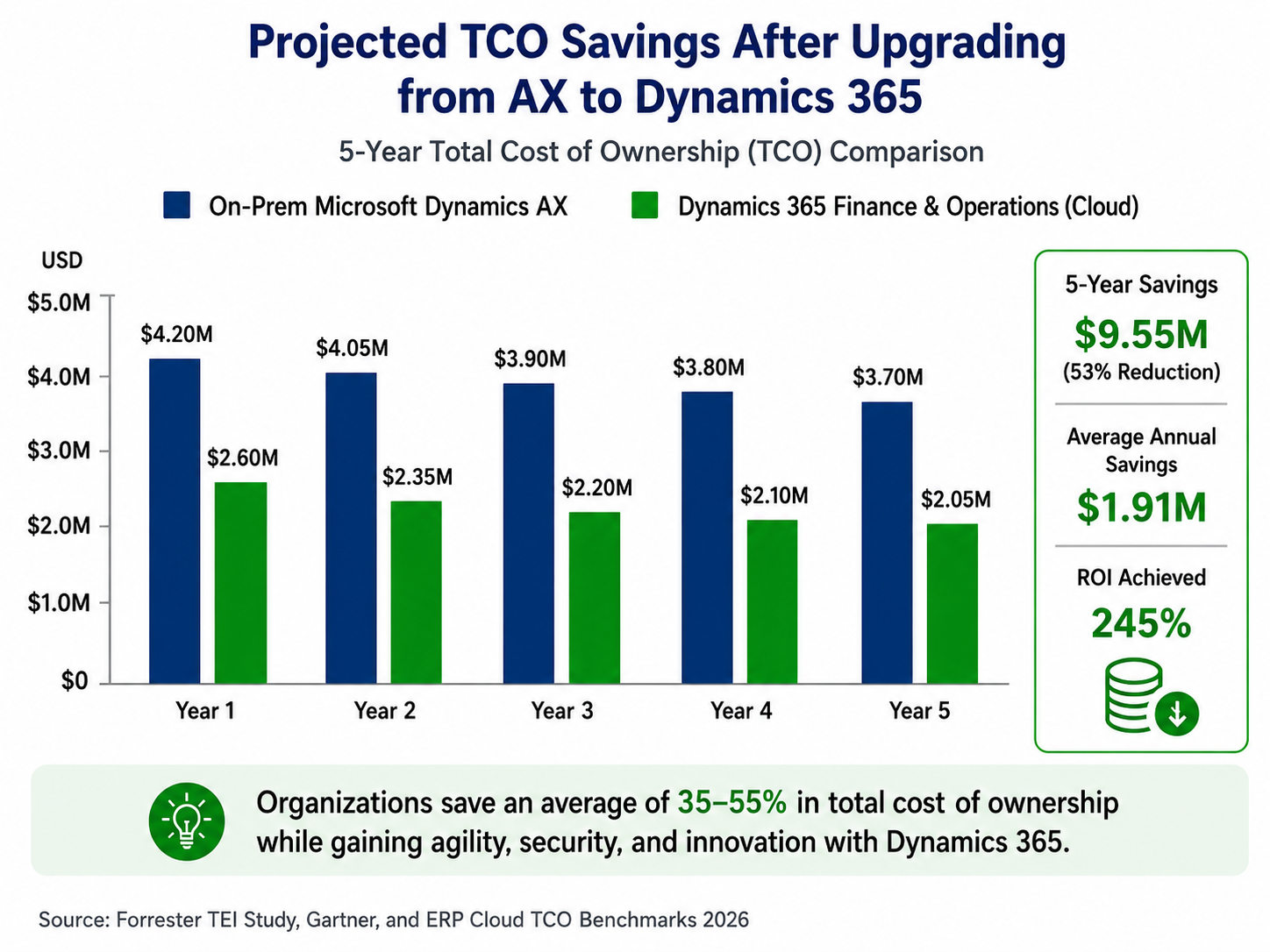
Many organisations upgrading from legacy ERP report measurable savings by reducing infrastructure costs, simplifying upgrades, and minimising dependency on custom patching cycles. Industry benchmarks commonly show cloud ERP migrations delivering 25%–55% TCO reduction over a multi-year period, depending on licensing model, infrastructure footprint, and customisation complexity.
Support and Security
Microsoft provides ongoing updates, advanced security features, and compliance tools that protect sensitive data. Legacy systems like Dynamics AX lack this level of support, leaving businesses exposed to greater security risks. Dynamics 365 also benefits from Microsoft’s continuous security investments in Azure, including identity and access management, encryption standards, and compliance support for frameworks such as ISO certifications and SOC controls.
Dynamics 365 has proven its value across industries by delivering measurable improvements in process efficiency, customer satisfaction, and revenue growth. Here is how businesses in different industries have benefited.
| Manufacturing | A manufacturing firm upgraded from Dynamics AX to Dynamics 365 and reduced order processing times by 30%. With real-time inventory tracking and improved supply chain visibility, they could better meet customer demands and cut costs. The platform’s IoT integration allowed the company to monitor equipment performance and predict maintenance needs, minimizing downtime and boosting operational efficiency. This is increasingly common in manufacturing environments where predictive maintenance and sensor-driven reporting reduce unplanned downtime and improve asset utilisation. |
| Retail | A retail company saw a 25% increase in sales by leveraging Dynamics 365’s AI-driven customer insights and personalized marketing capabilities. They also improved operational efficiency with integrated finance and inventory management. The system enabled them to identify buying patterns, optimize pricing strategies, and deliver targeted promotions, enhancing customer satisfaction and loyalty. With embedded analytics and real-time reporting, retail organisations can also improve demand forecasting accuracy and reduce overstock or stockout scenarios. |
| Healthcare | A healthcare provider transitioned from Dynamics AX to Dynamics 365 to better manage patient data and regulatory compliance. The platform’s enhanced data security features ensured compliance with healthcare regulations, while its analytics tools helped the provider improve patient outcomes by identifying trends and optimizing care delivery. This is especially important as healthcare organisations face increasing scrutiny around audit readiness, data privacy, and controlled access to sensitive records. |
| Distribution | A distribution company upgraded to Dynamics 365 to improve warehouse management and order fulfillment. By leveraging real-time data, they reduced errors, accelerated delivery times, and enhanced customer satisfaction. The platform’s automation features allowed them to process larger order volumes with the same resources, easily scaling their operations. Many distribution businesses also benefit from improved warehouse picking efficiency and faster inventory reconciliation through automated workflows. |
Step 1: Evaluate Your Needs
Before making the switch, assess your current system’s limitations. Identify the features you need most in Dynamics 365, whether that is better scalability, stronger analytics, or cloud capabilities. Knowing your priorities will guide the upgrade process. Involve cross-functional teams to make sure the chosen features align with your organization’s goals. This stage is also where many organisations identify which AX customisations can be retired or replaced with standard Dynamics 365 functionality to reduce complexity.
Step 2: Plan for Migration
Migrating from Dynamics AX to Dynamics 365 requires careful planning. Work with a trusted Microsoft Solutions Partner like LevelShift to map out your data migration, customizations, and training needs. A phased approach helps minimize disruptions to your business. Start with a pilot implementation to test the system in a controlled environment before rolling it out company-wide. Phased rollouts are often preferred for enterprises with multiple business units, legal entities, or complex integrations.
Step 3: Engage Your Team
Involve key stakeholders early to help ensure a smooth transition. Training and change management are critical. They help your team adopt the new system and get the most out of its capabilities. Provide hands-on training sessions and resources so employees feel confident using Dynamics 365. Regular feedback loops can also help refine the implementation process. User adoption is often one of the strongest predictors of ERP upgrade success, particularly when organisations are introducing AI-driven insights and automation workflows.
Step 4: Set Clear Goals
Define what success looks like for your upgrade. Whether it is reducing costs, improving efficiency, or gaining new capabilities, clear metrics help you measure the impact of the transition. Set a timeline and milestones to keep the project on track and ensure accountability. Typical ERP upgrade KPIs include reduced reporting time, improved inventory accuracy, reduced manual processing, and faster month-end financial close cycles.
Upgrading from AX to Dynamics 365 is more than adopting new technology. It is a strategic move that positions your business for long-term success. With modern features, enhanced flexibility, and robust support, Dynamics 365 helps you tackle today’s challenges while preparing for tomorrow’s opportunities. Its cloud-first approach, AI capabilities, and modular design make it a valuable tool for businesses looking to innovate and grow. For many organisations, it also improves audit readiness, strengthens cybersecurity posture, and supports scalable global operations.
Are you ready to explore what Dynamics 365 can do for your business? Contact us for a personalized demo and see the difference firsthand. If you are currently evaluating an AX upgrade strategy, this is also the ideal time to assess your licensing model, integration roadmap, and future ERP scalability requirements.

Aishwarya Nagarajan is a Senior Content Writer in the Microsoft Dynamics 365 practice at LevelShift, specializing in ERP and CRM transformation, AI-powered business applications, and customer engagement. She creates thought leadership and solution-focused content that helps organizations modernize operations, improve decision-making, and drive sustainable business growth.

Microsoft is not shutting off Dynamics GP tomorrow, and that is precisely the pr...

A successful AI agent pilot can demonstrate clear business value, but expanding ...

A high lead score feels like progress. The dashboard shows that a prospect is en...
What Agentic AI Means for the Future of CRM
A sales manager begins Monday morning with dozens of emails, forecast requests, overdue opportunities, and customer conversations awaiting a...

Dynamics 365 Finance and Operations Automation: Where Businesses Save the Most Time
Finance teams rarely struggle because they lack expertise. More often, they struggle because too much of their day is consumed by routine ad...

From Workflow to Autonomous Flow: Designing AI Agents for Accounts Payable Automation in Dynamics 365 F&O
A significant shift is underway in how finance teams approach accounts payable in Dynamics 365 Finance and Operations, and it goes beyond th...