Spring ’26 introduces a strong set of enhancements to Sales Cloud in Lightning. The focus is on making sales planning, execution, and productivity more intelligent, connected, and efficient.
These updates reduce manual effort while improving visibility and control across the sales lifecycle. Key improvements include territory modeling, quota planning, and deeper integration with email, calendar, and Agentforce capabilities.
In this article, we explore the most impactful Sales Cloud features from the Spring ’26 release.
You’ll see how Salesforce is strengthening territory and quota planning, embedding intelligence into daily seller workflows, and improving compliance and reporting controls.
It also expands Agentforce support across email, meetings, and lead management. Together, these updates help sales teams plan more accurately, execute faster, and stay aligned as business complexity grows.
1. Design Territories with Shared Boundaries
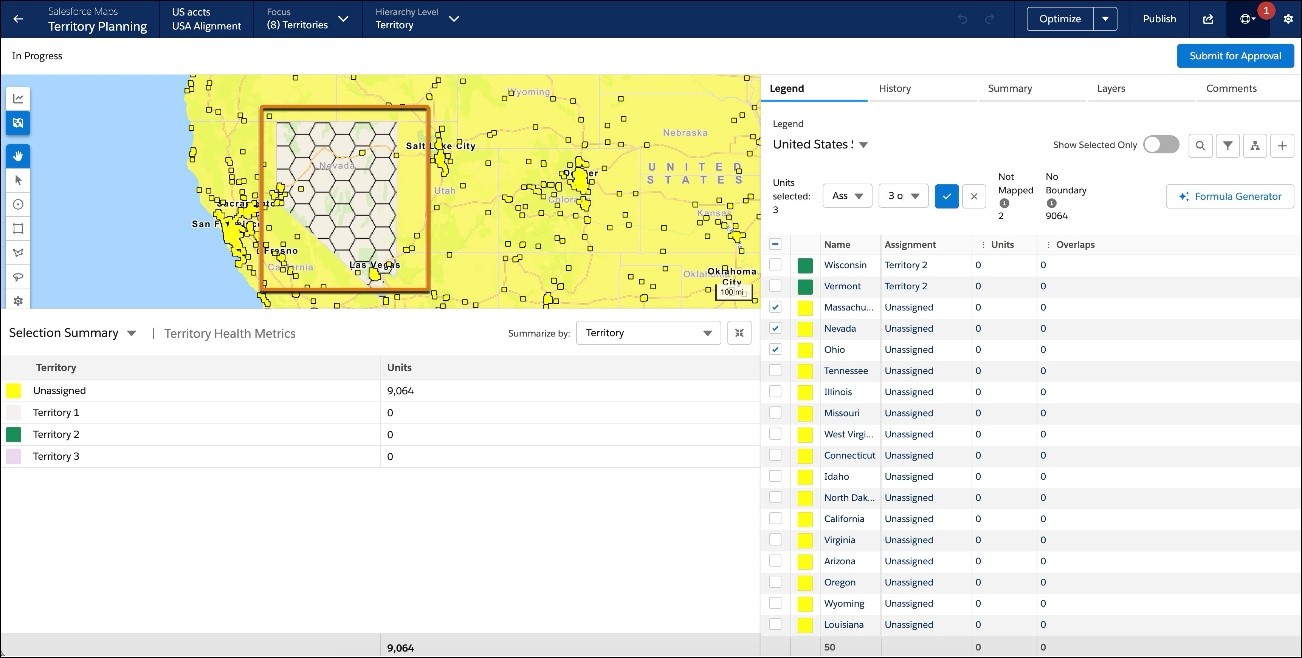
You can now refine territory design in densely populated regions by allowing a single boundary, such as a postal code, to be assigned to multiple sales areas. This helps you model complex geographies like New York City or London with greater flexibility. However, units can still belong to only one area, so assignment rules at the area level are used to ensure proper mapping when overlaps occur.
This capability is supported only for live data alignments. It gives teams more control when building and adjusting complex territory structures without disrupting existing models.
This change applies to Lightning Experience and Salesforce Classic in Professional, Enterprise, Performance, Unlimited, and Developer editions with Web Services API enabled.
How: Admins and users can enable overlapping boundaries through several methods in the boundary legend. To use the new Assign to Multiple Areas action, select boundaries, choose the action, select multiple areas from the picklist, then select Preview and Confirm your changes. Alternatively, you can inline edit the assignment field in the boundary legend by selecting multiple areas from the list of area names.
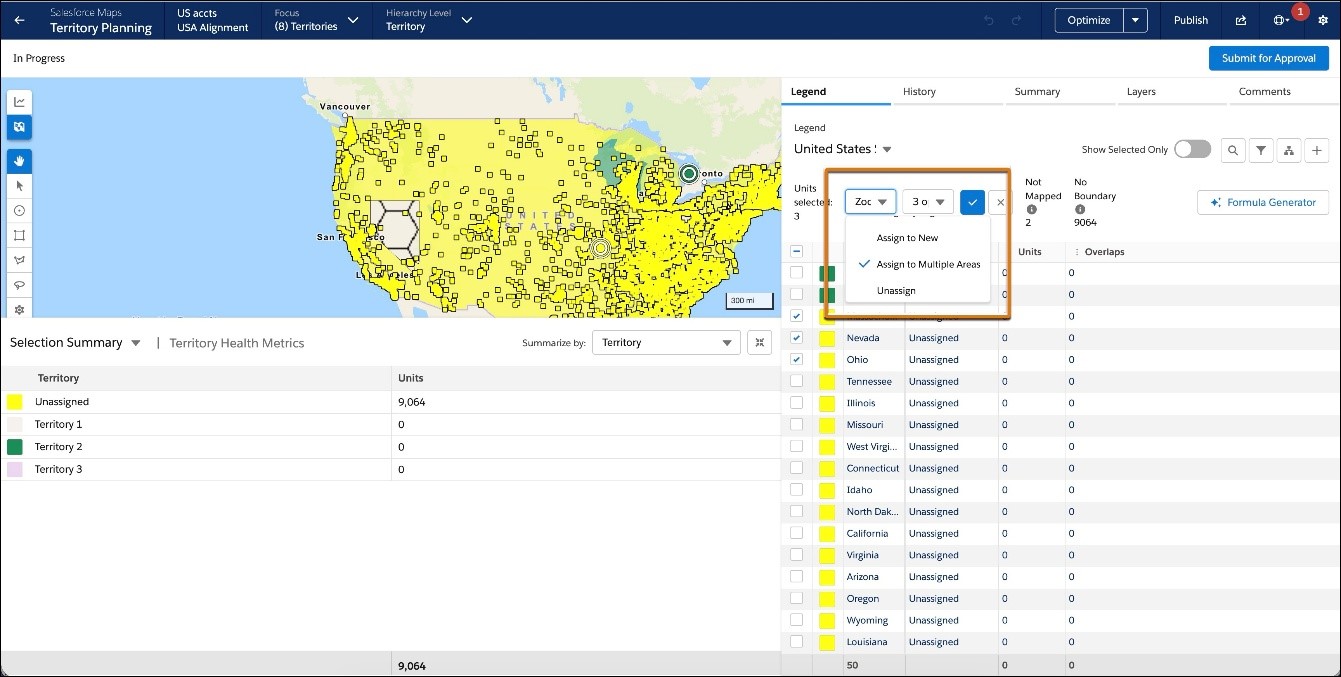

To modify overlapping areas independently or to enable optimization (which is disabled when overlapping boundaries are in focus), use the Set Focus action to temporarily remove overlapping areas from the map. Boundaries that overlap are denoted by a hexagonal “honeycomb” pattern on the map and in the boundary legend.
2. Allocate Financial Targets to Accounts in Territory Planning
Distribute top-down financial targets directly to accounts within Territory Planning. You can split targets evenly, weight them based on criteria like annual revenue, or distribute by defined segments. To ensure realistic planning, the allocation logic respects existing bottom-up targets set by the field. This alignment simplifies the transition from territory design to quota planning.
Where: This change applies to Lightning Experience and Salesforce Classic in Professional, Enterprise, Performance, Unlimited, and Developer editions with Web Services API enabled.
How: Configure a goal within an alignment connected to a segment data source to enable allocation options. Use an allocation formula to distribute targets using even, weighted, or bucketed methods, while automatically subtracting any existing bottom-up targets from the total. You can also import overrides or publish targets to use them in downstream quota planning.
3. Create Alignment-Based Quota Plans
Streamline the planning process by creating quota plans directly from existing territory alignments. Planners can now view account-level details and metadata within the quota planning interface to inform target setting. Because the plans share data, updates to territory models flow into the quota plan, ensuring assignments and targets remain synchronized.
Where: This change applies to Lightning Experience and Salesforce Classic in Professional, Enterprise, Unlimited, and Developer editions with Sales Planning in English only and with Web Services API enabled.
How: Select a territory alignment when creating a new quota plan to import the area hierarchy and account data. The hierarchy remains read-only within the quota plan to preserve the territory structure, but you can view account details and allocate targets based on the imported areas. If the source territory changes, such as a deleted area, the system flags the mismatch and prompts you to accept changes to keep the plans aligned.
4. Adopt Authorized Email Domains
If you previously worked with Salesforce Customer Support to disable email change verifications, set up authorized email domains instead. Salesforce is retiring the existing exemption process for disabling this feature, and authorized email domains provide the same benefit. This update is available starting in Spring ’26.
Where: This change applies to Lightning Experience, Salesforce Classic, and the Salesforce mobile app in all editions.
How: To review this update, from Setup, in the Quick Find box, enter Release Updates, and then select Release Updates. For Adopt Authorized Email Domains, follow the testing and activation steps.
5. Access Agentforce from Your Outlook Integration
Leverage the power of Agentforce directly from your Outlook integration to prepare for meetings, summarize records, and trigger custom actions.
Where: This change applies to Lightning Experience and Salesforce Classic in Essentials, Group, Professional, Enterprise, Performance, Unlimited, and Developer editions.
When: This change was available on a rolling basis starting December 2025.
How: If Agentforce is enabled, it automatically appears in your Outlook integration. Click Agentforce to start using it.


6. Access the Gmail Integration Directly in Sales Cloud Everywhere
Get immediate access to relevant CRM data alongside your email communication by accessing the Gmai Integration directly within Sales Cloud Everywhere.
Where: This change applies to Lightning Experience and Salesforce Classic in Essentials, Professional, Enterprise, Unlimited, and Developer editions.
When: Gmail Integration became available in Sales Cloud Everywhere in late June 2025.
How: Open the existing Gmail Integration panel and follow the prompts on the screen to move to the Sales Cloud Everywhere side panel. No changes have been made to how you use Gmail Integration in Sales Cloud Everywhere.


7. Ensure Compliance with Custom Disclaimers on Exported Reports
Ensure that your exported reports meet corporate policies and regulatory requirements by appending a custom disclaimer after the standard Salesforce disclaimer.
Where: This change applies to Lightning Experience in Enterprise, Professional, and Unlimited editions.
How: In Setup, in the Quick Find box, enter Reports and select Reports and Dashboards Settings. Select Use Custom Disclaimer on Exported Reports. In the text box, enter the custom disclaimer to show after the default Salesforce disclaimer.
8. Embed Custom Lightning Web Components in Dashboards for Interactive Data Views
Add custom Lightning Web Components (LWC) directly into Lightning Dashboards to create interactive, real-time data views that go beyond standard dashboard capabilities. Filter, explore, and act on data immediately without leaving your dashboard. For example, a business analyst can use a custom LWC to display a waterfall chart or other visualizations that are not available in standard dashboards.
Where: This change applies to Lightning Experience in Enterprise, Professional, and Unlimited editions.
How: To turn on this feature, contact Salesforce Customer Support. Then, in the dashboard edit mode, click +Widget and select Lightning Web Component. Configure the properties of the custom Lightning web component, and add the component to the dashboard.
9. Monitor Accurate Event and Email Sync with Detailed Metrics and Failure Reports
Get clear insights into event and email sync status with accurate metrics. For example, identify and resolve setup issues more effectively and improve user trust with sync failure reports.
Where: This feature is available in Lightning Experience in Starter, Professional, Enterprise, Unlimited, Einstein 1 Sales, and Agentforce 1 Sales editions. It’s also available with the Einstein for Sales, Sales Engagement, and Revenue Intelligence add-ons.
How: On the Reports tab, you can find reports on event sync time between Salesforce and the email account connected to Einstein Activity Capture, email sync status, and sync failures.

10. Capture Leads and Schedule Meetings Autonomously
Effortlessly capture inbound web and messaging leads, answer inquiries, and schedule meetings with your prospects by setting up Inbound Lead Generation.
Where: This feature is available in Lightning Experience in Enterprise, Performance, and Unlimited editions with the Agentforce for Sales add-on. Setup for agents is available on the desktop site.
How: From Salesforce Go, navigate to the Agentforce for Sales setup page and select Inbound Lead Generation. Follow the guided setup to enable the required features, assign permissions, and get your agent generating leads.
11. Control and Customize Agent Behavior Faster with Modular Topics and Actions
You can now directly view and modify each step of the Lead Nurturing agent workflow, eliminating the need for complex prompt engineering. In Agentforce Builder, the agent’s logic appears as discrete, configurable topics and actions that are easy to navigate and edit.
Where: This change applies to Lightning Experience in Enterprise, Performance, and Unlimited editions with Sales Cloud and the Agentforce Lead Nurturing add-on. Setup for agents is available on the desktop site.
Why: For example, you could easily update the Return Calendar Link action to use a custom link for booking meetings.

How: In Agent Builder, find the Return Calendar Link action and insert your custom link. The agent will immediately begin using it for all meeting requests.
12. Manage Deals Directly from the Agentforce Sales App in ChatGPT
Sellers can research leads and accounts, plan sales strategies, and update Salesforce records—all powered by secure, accurate, and real-time CRM data, while using the Agentforce Sales App in ChatGPT. This seamless connection helps sales teams close deals faster and maintain data accuracy, directly within their flow of work.
Where: This feature is available in Enterprise, Performance, and Unlimited editions with the Agentforce for Sales add-on, and in Agentforce 1 Sales Edition.
How: From the gear icon, select Salesforce Go, and search for Agentforce Sales ChatGPT App (Beta). Go to the Agentforce Sales ChatGPT app (Beta) page and turn on the feature. Next, go to ChatGPT to publish the app. After these steps are complete, your users must connect the Agentforce Sales ChatGPT App to their Salesforce accounts.
13. Use Call Summaries and Generative Insights Across All Calls with Generative ECI
We’re combining the call summary and generative conversation insight features together with Generative ECI. The feature works across both voice and video calls, is available to all users without additional licenses, and is automatically enabled for orgs using generative AI features.
Where: This feature requires Einstein Conversation Insights and is available in Lightning Experience in Enterprise, Performance, Unlimited, and Agentforce 1 Sales editions. Einstein generative AI is available in Lightning Experience.
Who: This feature is available to users with access to Einstein Conversation Insights.
Why: Get call summaries automatically for all ECI calls. A standard call summary includes the summary itself, the customer impression, and any next steps.
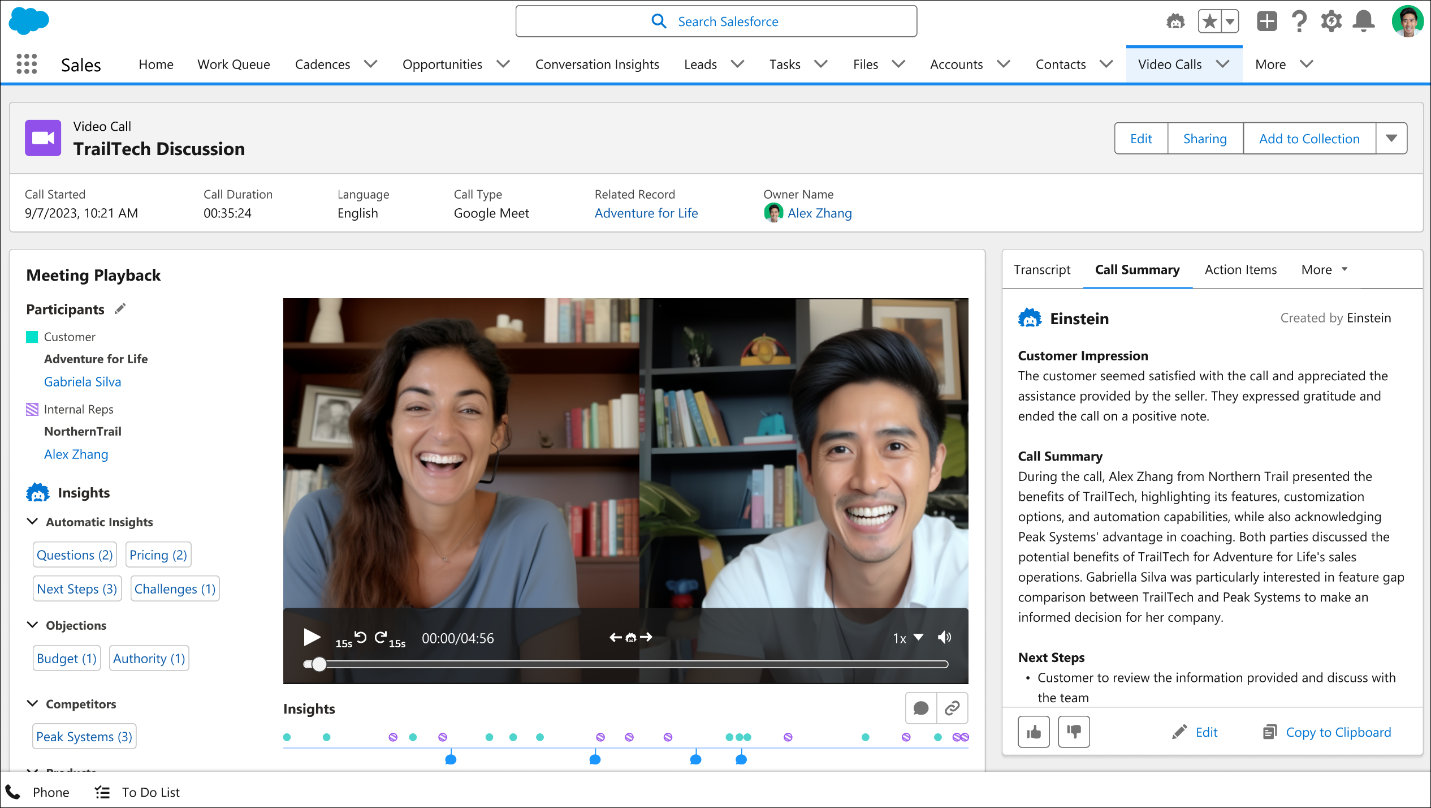
Admins can also create custom insights for their video calls. Using generative AI, get answers to things such as customer sentiment or deal terms surfaced for sales conversations automatically. We’ve increased the limit of available generative insights to eight.
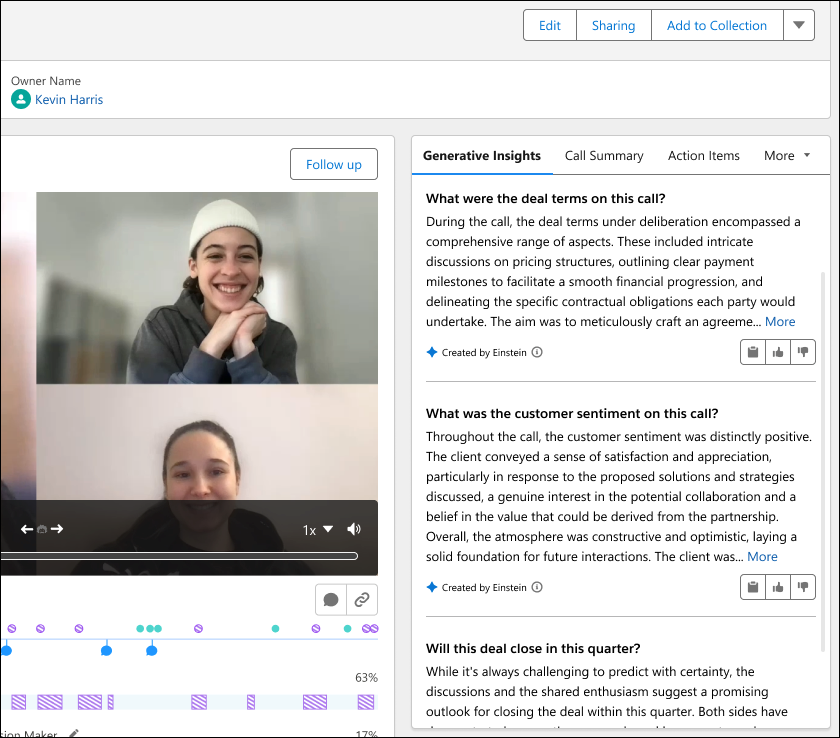
How: Generative ECI is automatically enabled for orgs already using Call Summaries or Generative Conversation Insights.
From Salesforce Go, enter Einstein Conversation Insights under Features. Then enable Generative ECI.
No new permission sets are required. References to Call Summary and Generative Insights are no longer available in Setup.
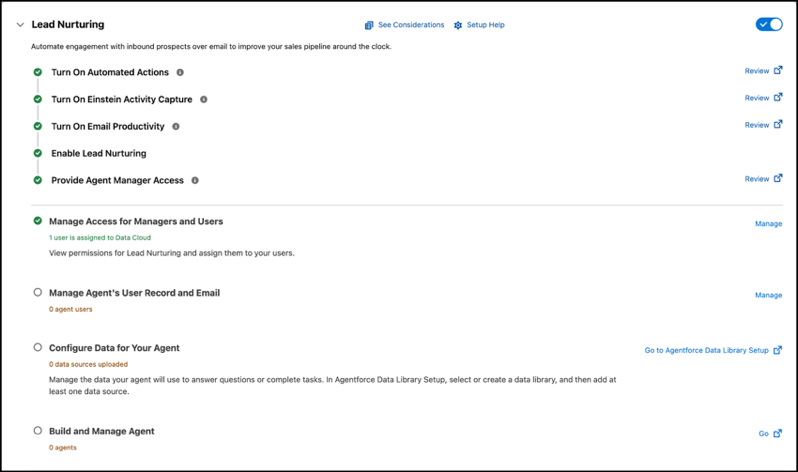
14. Set Up Agentforce Lead Nurturing Faster with Guided Configuration
When you’re ready to create a Lead Nurturing agent, the new guided setup experience in Salesforce Go saves you time and simplifies the process by automating several steps.
Where: This change applies to Lightning Experience in Enterprise, Performance, and Unlimited editions with the Agentforce SDR add-on. Setup for agents is available on the desktop site.
Why: The guided setup process reduces the number of steps and lets you configure and test your agent all in one place. Setup takes care of tasks like creating a user record for the agent, assigning it permissions, and configuring Einstein Activity Capture.
How: From Salesforce Go, click Agentforce for Sales and follow the instructions.
15. Make Captured Emails Available as Activity Data by Updating Einstein Activity Capture
Use an option in Setup to update Einstein Activity Capture and migrate previously captured email to Salesforce activity data. With this update and migration, all new email data and previously captured email data are synced, stored, and available as activity data. This update and migration makes email data available to platform tools and operations. After you start the update and migration process, it runs and is completed automatically.
Where: This feature is available in Lightning Experience in Starter, Professional, Enterprise, Unlimited, Einstein 1 Sales, and Agentforce 1 Sales editions. It’s also available with the Einstein for Sales, Sales Engagement, and Revenue Intelligence add-ons.

Conclusion
The Spring ’26 Sales Cloud release reinforces Salesforce’s focus on intelligence, alignment, and efficiency across every stage of the sales process. With enhancements to territory and quota planning, deeper integration with email and calendar tools, expanded Agentforce capabilities, and stronger compliance and reporting controls, sales teams can move away from fragmented workflows toward more connected, data-driven execution.
These updates not only improve seller productivity and planning accuracy but also help organizations maintain consistency, governance, and scalability as sales operations become more complex. By embedding automation and intelligence directly into daily workflows, Spring ’26 enables sales teams to focus more on meaningful customer engagement and less on manual coordination.
Connect with our experts to understand how these Spring ’26 Sales Cloud features can be implemented effectively and aligned with your sales strategy and operating model.
![Top New Features in Spring ’26 Release: [Sales Cloud in Lightning]](/_next/image?url=https%3A%2F%2Fresources.levelshift.com%2Fwp-content%2Fuploads%2F2026%2F01%2FSpring-26-Sales-Cloud-features.png&w=3840&q=75)